

beatmania IIDX support, rebuilt song list filters, and levels you accept challenges for
This release adds beatmania IIDX support, rebuilds the song list filters, lets you mark which levels you accept challenges for, and lets players join Score Attack from home versions. It also adds an iPhone Home Screen widget and lets you attach images and video to bug reports.
1beatmania IIDX support
1-1Chart view for BPM-change songsPlan for BPM-change songs before you play. The chart view scrolls the way it does in the game, so you can check where to press START twice or do a scratch flick, and see the green number at each point. 1-2Save lucky RANDOM lane picksSave your lucky RANDOM lane picks and aim for them with the Random Lane Tickets you own. Register the tickets you have, and lane picks you can get with them are marked "Ticket for a hit lane order". You can also see community lane picks. 1-3Same features as other gamesSync, recommendations, the song list and filters, Tier Lists, goals and the growth board (Class and Arena) work for IIDX just as they do for the other games.
1-4Please noteInitial stats come from Tachi records (203 SP and 161 DP players). T-scores, the share of players who reached each goal in recommendations, and Tier List rows will change as more players registerStats for new songs in 34 ZINRAI stay blank until 20 players have registered. The "Compare" tab in song details shows "Preparing data"Community lane picks start out emptyTier Lists show tiles with the difficulty color, song title and version logo instead of jackets. Feedback on their look is welcome through the report formScores from plays that did not beat your personal best, SCORE CLASS, and clear rates are not shown, because the official site does not provide themImporting from INFINITAS is not supported yetChart view covers Lv8 and up. It is not available for the 80 HYPER and 9 ANOTHER charts of new songs in 34 ZINRAI (not yet on Textage), or for the DP ANOTHER charts of 流桜ノ門 and 月下繚乱 (the Textage charts have one more note than BEMANIWiki, Tachi and bm2dx)
2Song list filters
2-1Pick levels on a bar chartFilters have been rebuilt for every game. Pick a level range by dragging two handles over a bar chart of chart counts per level. In SDVX, there is one bar per decimal level, such as 18.2. 2-2Strength and Main radar axisFilter by Strength (Strong, Standard, Weak) and by Main radar axis (SDVX, DDR and IIDX). 2-3DDR flare rankIn DDR, filter by flare rank. A new setting counts Flare Skill gains only up to the flare you are aiming for (for example, IX).
2-4Versions, lamps and gradesSelected versions are shown with their official logos. Lamps and grades can be selected by sliding your finger across them.
3Challenges
3-1Mark the levels you acceptMark the levels you accept challenges for as "Welcome", "OK" or "No" for each game. Slide your finger to mark several at once. 3-2A short note and level marksAdd a short note (up to 28 characters) that friends see when they send you a challenge. When sending a challenge, levels your friend welcomes are marked with ★ and levels they decline are marked with ⊘. 3-3Charts you can't send, and pause reasonsCharts your friend already has as challenge songs can no longer be sent. When several reasons for pausing challenges apply, your friend sees the most specific one (per song, then per game, then all). While all challenges are paused, per-song pausing is disabled. 3-4pop'n music medal goals"Clear in this version" and medals have been added as goals. You can set a higher medal as the goal even on songs you have already cleared.
3-5SDVX "Play" challengesFixed "Play" challenges not being completed by plays that did not change your score.
4Score Attack
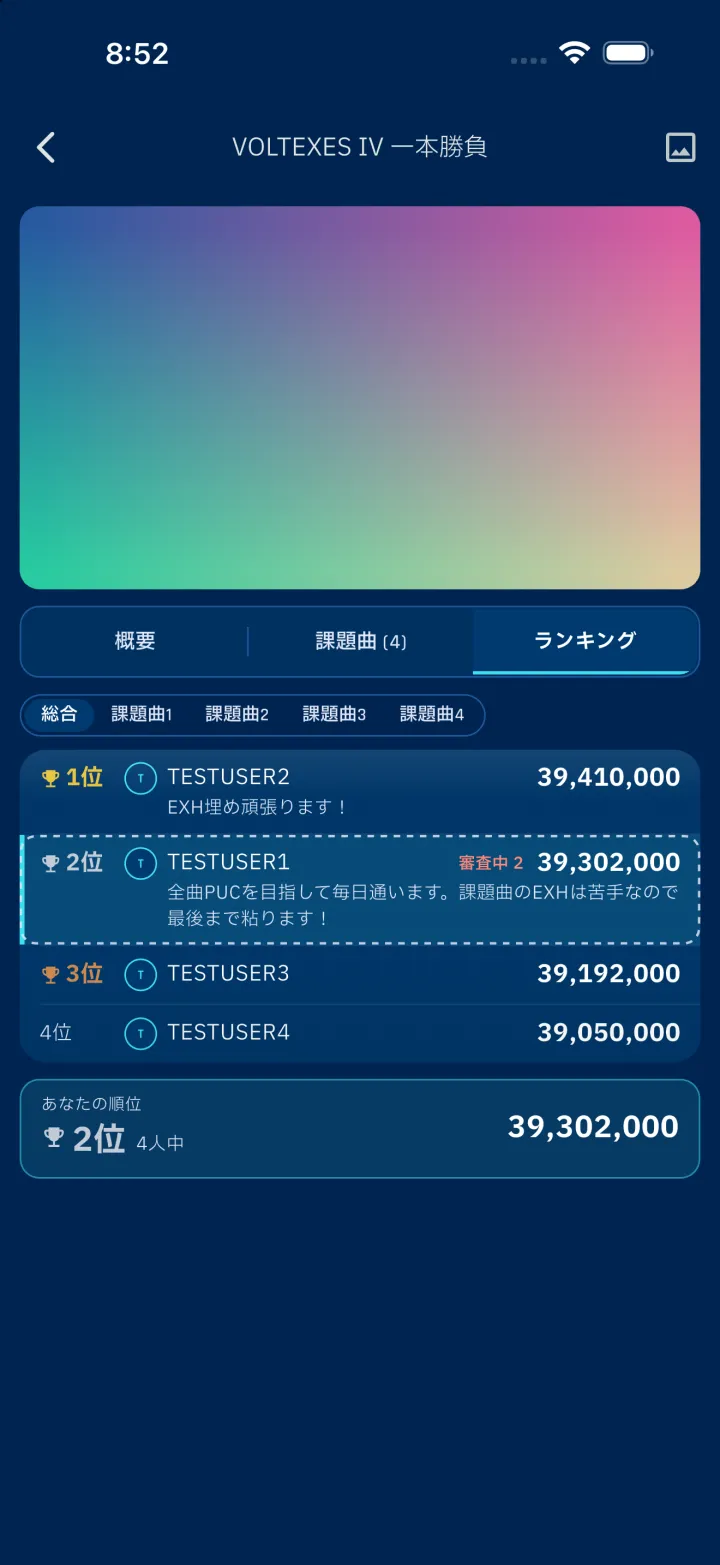
4-1Entries from home versionsWhen creating a Score Attack, choose whether to allow entries from home versions ("Allowed" or "AC only"). 4-2Home version scoresHome version scores are submitted with a result image and marked "Home" in the rankings and elsewhere. 4-3Full commentsComments are shown in full instead of being cut off with "…". 4-4Edits during an eventOrganizers can change the title, description, period and image while a Score Attack is running. Once results are final, everything except the period can still be changed. 4-5Count and order on HomeIn Settings, choose how many Score Attacks appear on Home (3, 5 or 10) and their order (Ending soonest or Newest, with an option to show joined ones first). Badges such as pending reviews have been removed from the Score Attack heading on Home and are now shown only on each Score Attack's row.5Growth
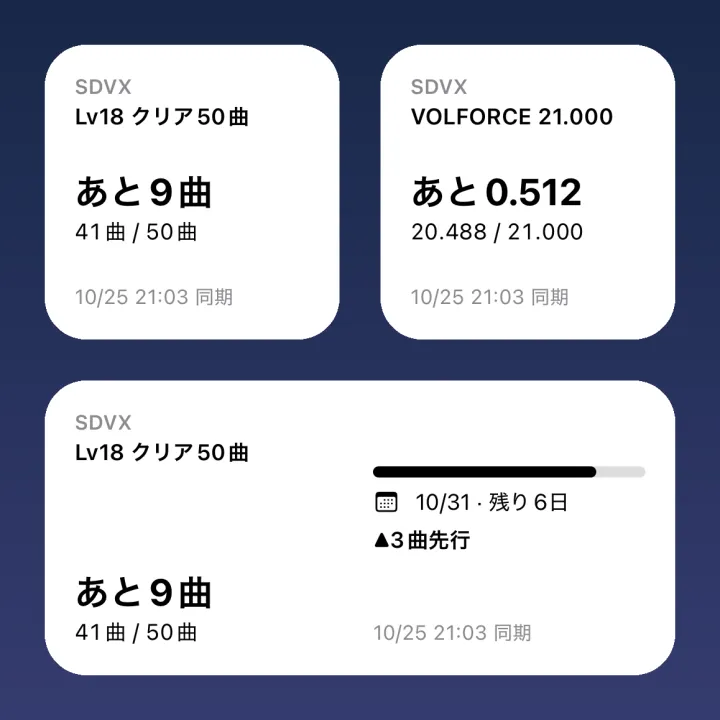
5-1Home Screen widgetAn iPhone Home Screen widget shows how far you are from your growth tab goals (iOS 17 or later, small and medium sizes). Tap it to open that goal.6Game-specific
6-1SDVX judge timing in 1 ms stepsIn SDVX, when judge timing is shown in ms, you can adjust it 1 ms at a time. 6-2Separate defaults for GITADORA and DDRGITADORA (GF and DM) and DDR (SP and DP) now keep separate defaults for judge timing, visual timing and Hi-Speed. Your previous values carry over to both.
6-3DDR chart viewer14 more songs can be viewed in the chart viewer.
6-4SDVX decimal-level Tier ListsFor Lv17 and up, choose the decimal-level Tier List (18.0, 18.1 and so on) from a menu that opens from the level tag.
6-5GITADORA XG cabinet recordsRecords from the XG cabinet version are also imported. For charts played on both, the higher achievement rate is kept.
6-6Other changesSDVX: EX scores that are too low for the normal score (such as a low EX on a PUC) are left out of Strength and statsGITADORA: The default part on the GF tab is now "Gt+Ba"pop'n music: Rows below the level range you play most are no longer dimmed in the detailed song list view
6-7FixesSDVX: Sync failing for levels whose song list fits on one pagepop'n music: Your pop'n Class gain showing ±0 in the results after you stopped a sync partwaypop'n music: Charts with no medal or a blue medal are now treated as not cleared in song details, growth, Score Attack and filters
7Other improvements and fixes
7-1Uncleared songs in Tier ListsTier Lists can be narrowed down to uncleared songs only. When the metric is not "Clear", charts below the target count as uncleared. 7-2Images and video in reportsFeature requests and bug reports can include up to 4 images and 1 video (up to 60 seconds).
7-3Strength valuesStrength now shows its actual value even below 0 or above 100. Below 50 it drops more gently, and the "Weak" tag appears only on charts at 30 or below.
7-4OtherAfter signing in again with your KONAMI ID, sync starts right away instead of stopping on the e-amusement pageThe app now fills the whole screen on iPhone DuoFixed symbols such as ā, ī and Ō in song titles shifting into the next characterFixed tags and numbers shrinking too much with large text
1-1
-
4-3Full comments
Comments are shown in full instead of being cut off with "…".
-
5-1Home Screen widget
An iPhone Home Screen widget shows how far you are from your growth tab goals (iOS 17 or later, small and medium sizes). Tap it to open that goal.